

Most workflow documentation goes stale for the same reason. A person has to create it, and a person has to keep it current. Nobody has time for the second part.
The tools below differ in how much they depend on that person. Some need you to press record. Some need you to type every step. One runs in the background and does the capture for you. This list is for small and mid-size teams, roughly 5 to 500 people.
Disclosure: we build MemoryLane, one of the tools on this list. We have tried to be fair to every option, including the ones we compete with.
Comparison
| Tool | Best for | How it captures | Stays current | Starting price |
|---|---|---|---|---|
 Scribe Scribe | Click-by-click SOPs | You press record | Re-record when it changes | Free, then $23/user/month |
 Tango Tango | In-app walkthroughs | You press record | Re-record when it changes | Free, then $15 to $22/user/month |
 MemoryLane MemoryLane | Mapping workflows without manual work | Runs in the background | Yes, keeps capturing | Individual and team plans |
  Google Docs or Word Google Docs or Word | Your first few SOPs | You type it | Only if someone edits it | Included with Workspace or Microsoft 365 (from $7/user/month) |
 Notion Notion | SOPs in your team wiki | You type it | Only if someone edits it | Free, then $10/member/month |
 Lucidchart Lucidchart | Formal BPMN diagrams with an audit trail | You draw it | Only if someone redraws it | Free, then $9/user/month |
 draw.io draw.io | Formal diagrams for free | You draw it | Only if someone redraws it | Free |
1. Scribe and Tango: best for click-by-click SOPs
Scribe and Tango work the same way. You press record, do the task once, and press stop. The tool turns every click into a step with a screenshot and a short instruction.
For click-by-click SOPs, this works well. It is much faster than writing steps by hand, and the screenshots are accurate because they come from a real run. Tango adds interactive walkthroughs that guide people through a task inside the app.
The limit is that both are driven by people. Someone has to know the task is worth documenting, remember to press record, and do it the "proper" way while recording. The guide shows one run by one person, not the shortcuts and variations the rest of the team uses. And when the process changes, someone has to record it again.
Pricing: Scribe is free, then $23/user/month. Tango is free (5 workflows, browser only), then $15 to $22/user/month.
Best for: Training guides for tasks you already know matter.
2. MemoryLane: best for mapping workflows without manual work
MemoryLane is workflow capture software for small and mid-size teams. It runs in the background, maps your workflows automatically, writes SOPs from what it captures, and ranks workflows by time spent and automation potential.
The difference from Scribe and Tango is that it is passive. No one presses record. This approach is also called task mining. It runs on Windows and Mac desktops while people work, across desktop apps and web-based systems. So you discover workflows without relying on anyone to remember, pick, or describe them. MemoryLane is used by companies from 20 to over 1,000 people, most with 100 to 500 employees, in software, SaaS, retail, retail distribution, staffing, healthcare, financial services, and e-commerce.
What you get:
- Workflow maps for each person, or by team when you roll it out centrally.
- SOPs written automatically from what it captures, not from memory.
- A ranked list of what to automate first, by hours per week and how well each workflow suits AI or automation.
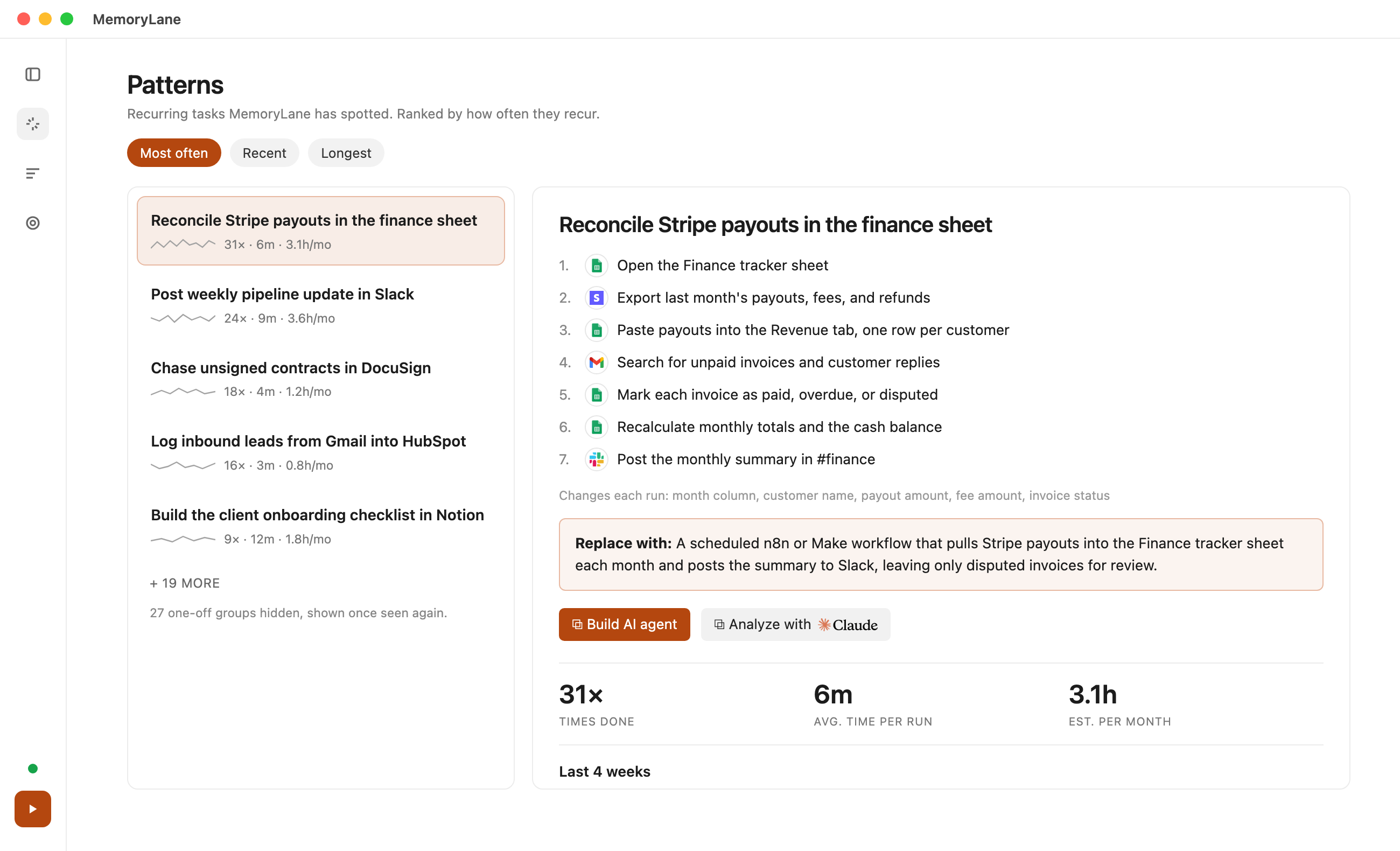
You can also pull everything out through MemoryLane's MCP server. MCP lets AI assistants like Claude read your workflow data directly. Ask Claude to write an SOP, draft an automation, or export a workflow map as PDF, HTML, BPMN, or Mermaid. Claude can also send it straight to Lucidchart, Notion, or any other tool that has its own MCP.
Privacy is built in. Captured data stays on each device. Screenshots are turned into text summaries through zero-data-retention AI providers, then deleted. Common personal data like emails, phone numbers, SSNs, and card numbers is redacted before anything is stored. IT can block apps and websites from capture for the whole company, and anyone can pause capture in one click. For how to introduce it to your team, read why task mining is not employee monitoring.
Best for: Teams that want their workflows mapped without anyone doing it manually.
3. Google Docs and Word: best for your first few SOPs
This is where most small teams keep their SOPs. Everyone already has it and knows how to use it.
The problem is that docs are text-first. You can embed images, but they are static. A flowchart has to be built in a separate tool, exported as an image, and pasted in. When the process changes, someone has to find the original file, edit it, export it again, and replace the image. Nobody does. The text gets a quick edit, the diagram stays as it was, and within a few months the two disagree.
That is how most implementations go stale. Not because people are lazy, but because keeping a doc in sync with reality is a second job nobody was hired for. Every step is also typed from memory, so the small steps people do on autopilot never make it in.
Best for: Writing your first few SOPs.
4. Notion: best for SOPs in your team wiki
Notion is the step up from scattered docs. Pages link to each other, databases let you tag each SOP with an owner and a review date, and everything sits in one searchable wiki.
It is still text-first. Notion can render simple diagrams from Mermaid code, which helps, but most teams still paste in screenshots of flowcharts from somewhere else. Those go stale the same way they do in Google Docs. And every SOP is still written by hand.
Best for: Teams that want SOPs in the same place as the rest of their internal docs.
5. Lucidchart and draw.io: best for formal BPMN diagrams
Lucidchart is a proper diagramming tool. Swimlanes, BPMN notation, version history, a shared process repository, and admin controls on the higher plans.
draw.io is the free alternative. It has the same kind of shapes, including BPMN, runs in the browser or as a desktop app, and saves straight to Google Drive, OneDrive, or your computer. If your team lives in Google Workspace, it fits in with no new account.
Lucidchart's feature set fits mid-size and enterprise companies, especially in regulated industries that need audit trails and formal BPMN diagrams. For most small businesses it is more than they need. Both tools are fully manual. Someone interviews the team and draws every box, and someone has to redraw it when the process changes. For more formal tools like Visio, see best process mapping software.
Pricing: Lucidchart is free, then $9/user/month. draw.io is free.
Best for: Lucidchart for mid-size and larger companies that need formal BPMN diagrams and an audit trail. draw.io for the same diagrams at no cost.
Which one should you use
| Use case | Recommendation |
|---|---|
| You need training guides for a known task | Scribe or Tango |
| You need to discover and map workflows without anyone doing it manually | MemoryLane |
| You are writing your first SOPs | Google Docs or Word |
| You want SOPs in your team wiki | Notion |
| You need formal BPMN diagrams and audit trails | Lucidchart |
| You need formal diagrams for free | draw.io |
These tools work well together. A common setup: MemoryLane finds the workflows and drafts the SOPs, then the team keeps the important ones in Notion or Google Docs.
FAQ
Is there workflow capture software that runs without pressing record?
Yes. Scribe and Tango record only while someone has pressed record. Workflow capture tools like MemoryLane run in the background and capture workflows continuously. Enterprise options like Celonis and Mimica also do this but start at $100K+. See Celonis vs UiPath vs Mimica.
Is there free workflow mapping software?
Yes. Scribe, Tango, Notion, and Lucidchart have free tiers, and draw.io is fully free. See our free process mapping software list.
Can I use workflow capture with employee monitoring laws?
Usually yes, with notice. New York's Civil Rights Law 52-c, for example, requires employers to give written notice of electronic monitoring and get employees to acknowledge it. It does not ban monitoring. Check the rules in your state or country with your counsel.
Next steps
If you already know your workflows, Scribe or Tango will document them quickly. If you do not, find out first. Try MemoryLane on your own work first, or get in touch to plan a team rollout.