
Workflow capture software, also called task mining or process capture software, records how work actually happens on people's computers. It turns that into workflow maps and a list of what to automate.
Small and mid-size teams usually want two things from it: a true picture of where the hours go and a ranked list of what to automate first. The tools below differ in how they get there. Some need someone to press start and stop for every task. Others run in the background and capture work continuously, so process discovery happens without anyone choosing what to record.
This list is for teams of roughly 5 to 500 people. Scribe Optimize is aimed at larger companies, but it is the closest comparison, so it is here too. Mimica, Skan, and Fluency are enterprise tools, included so you can see what the larger options do. For Celonis, see Celonis vs UiPath vs Mimica.
Disclosure: we build MemoryLane, one of the tools on this list. We have tried to be fair to every option, including the ones we compete with.
Workflow capture and task mining tools compared
| Tool | Best for | How it captures | Pricing |
|---|---|---|---|
 Scribe Optimize Scribe Optimize | Large companies whose work happens in the browser | Automatic, browser only | Quote only, expect $100K+ annual contract |
 MemoryLane MemoryLane | Mapping workflows without manual work | Automatic, desktop and browser (Windows, Mac) | Individual and team plans |
 Power Automate Power Automate | Microsoft 365 teams automating a known task | You press start and stop (Windows only) | $15/user/month (Premium) |
 UiPath Task Mining UiPath Task Mining | Teams already building UiPath bots | You press start and stop (Windows only) | Quote only, expect $100K+ annual contract |
 Mimica Mimica | Large enterprises that want maps and SOPs | Automatic, desktop and browser (Windows, Mac) | Quote only, expect $100K+ annual contract |
 Skan Skan | Banks, insurers, and other regulated enterprises | Automatic, desktop and browser (including virtual desktops) | Quote only, expect $100K+ annual contract |
 Fluency Fluency | Enterprises with 1,000+ employees | Automatic, desktop and browser | Quote only, expect $100K+ annual contract |
1. Scribe Optimize
- Best for
- Large companies already using Scribe whose work happens in the browser.
- How it works
- Captures workflows automatically for people who have opted in, in apps an admin approves. Browser apps only. Desktop apps are not captured.
- Pricing
- Quote only, expect a $100K+ annual contract. Not yet generally available.
Scribe is the most widely used tool on this list, best known for click-by-click guides. You press record, do a task, and get a step-by-step guide with screenshots. Scribe Optimize is its first step into automated process mapping, and it works differently. There is no start or stop button. For people who opt in, in apps an admin approves, it captures workflows on its own, builds process maps, suggests what to standardize or automate, and estimates the return.
The catch is that Scribe Optimize is browser-only. It sees work in web apps, but not in desktop apps like Excel, a desktop ERP, or accounting software installed on the PC. Desktop support is still on Scribe's roadmap. If much of your team's work happens outside the browser, that work will be missing. Optimize is also at the very beginning. Scribe's own announcement says it is not yet generally available, so access is by demo request.
2. MemoryLane
- Best for
- Teams that want their workflows mapped and ranked without anyone doing it manually.
- How it works
- Runs in the background on Windows and Mac, across browser and desktop apps. No one presses record.
- Pricing
- Individual and team plans
MemoryLane is workflow capture software for small and mid-size teams. It runs in the background, maps your workflows automatically, and ranks workflows by time spent and automation potential.
The difference from recorder-based tools is that it is passive. No one presses record, and no one has to know in advance which workflow is worth looking at. Unlike Scribe Optimize, it captures desktop apps as well as the browser, so it also sees the work between systems, like copying a number from an email into a spreadsheet. MemoryLane is used by companies from 20 to over 1,000 people, most with 100 to 500 employees, in software, SaaS, retail, retail distribution, staffing, healthcare, financial services, and e-commerce.
What you get:
- Workflow maps for each person, or by team if rolled out centrally.
- A ranked list of prioritized automation opportunities by hours per week.
- Raw data access via MCP, so AI assistants like Claude can read your workflow data directly.
- SOPs on request. MemoryLane does not write SOPs itself, but Claude or another AI assistant can turn any captured workflow into one.
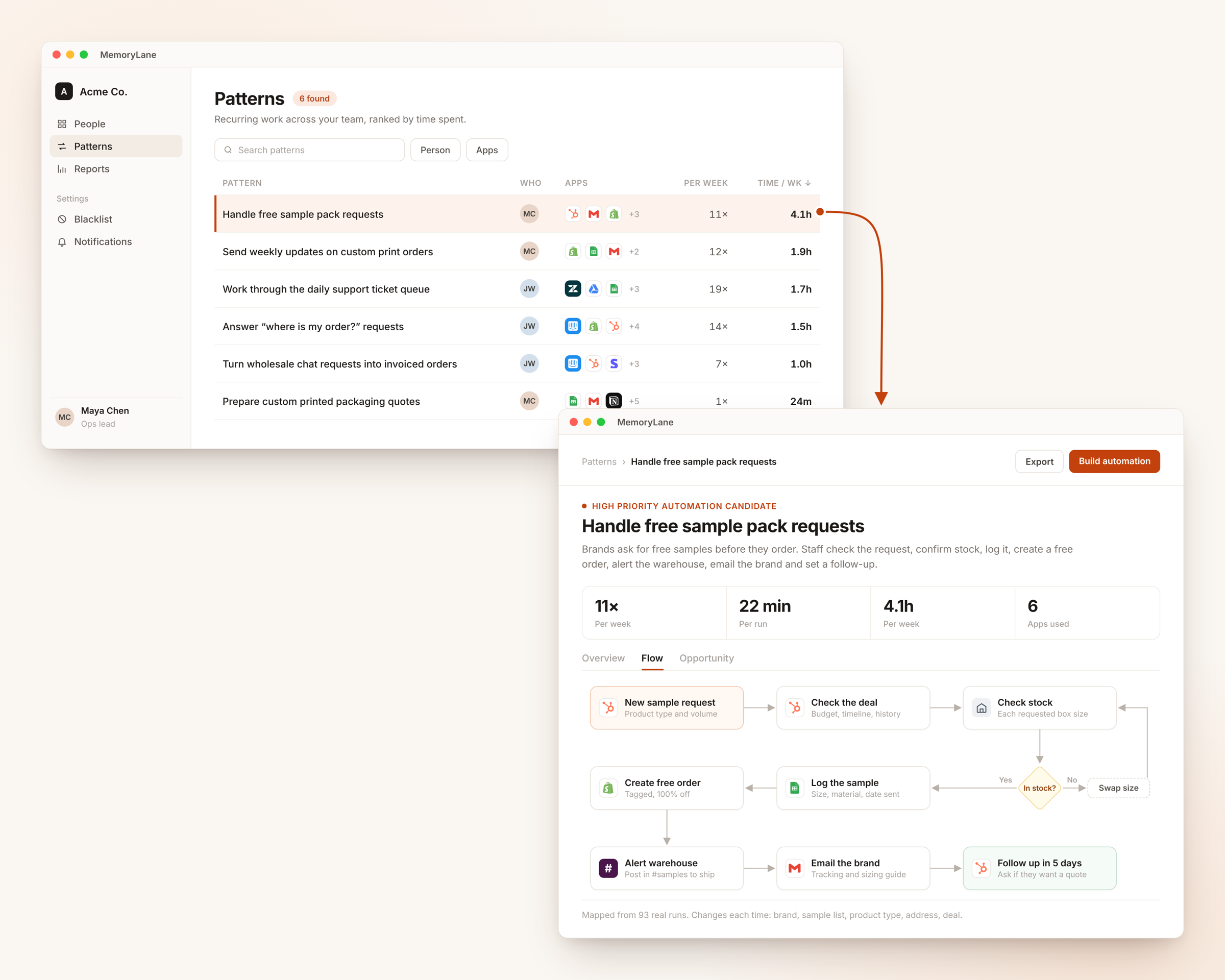
Summaries are stored on each device, not on MemoryLane servers. Screenshots are sent to zero-data-retention AI providers to be summarized, then deleted, and anyone can pause capture in one click. The tradeoff is that MemoryLane only sees work on computers where it is installed. It does not read system event logs the way process mining does. For more on the approach, read task mining for small and mid-size teams.
3. Power Automate
- Best for
- Microsoft 365 teams that already know which task they want to automate.
- How it works
- Someone presses start in the recorder on a Windows PC, does the task, and presses stop.
- Pricing
- Included in Power Automate Premium, $15/user/month billed annually.
Power Automate includes a task recorder as part of its process mining feature. A person opens the recorder in Power Automate for desktop, does the task, and stops. Power Automate groups the recorded steps into activities, builds a process map, shows which apps the time goes to, and suggests automations.
For a team already on Microsoft 365, this is the easiest way in. The catch is that the capture is manual. Someone has to pick the task, remember to record it, and record it again when it changes. That costs time, and it misses every task nobody thought to record. It runs on Windows only, and setup needs a Dataverse environment (Microsoft's business database) plus some admin work.
4. UiPath Task Mining
- Best for
- Teams already building automations with UiPath.
- How it works
- Someone presses start in the recorder on a Windows PC, does the task, and presses stop.
- Pricing
- Quote only, expect a $100K+ annual contract. Task Mining is in UiPath's Standard and Enterprise plans, not the $25/month Basic plan.
UiPath Task Mining installs a recorder on Windows PCs. Someone starts a recording, does the task, and UiPath captures screenshots and actions. It merges recordings of the same task and can export a draft automation that a developer finishes as a UiPath bot. That direct path from a recording to a working automation is its main strength.
Like Power Automate, the capture is manual. UiPath removed Unassisted Task Mining, its background recording mode, in December 2025, so someone has to choose each task and record it. The output is built for automation developers, not for the operations lead who wants to know where the team's week goes.
5. Mimica, Skan, and Fluency
- Best for
- Large enterprises with a transformation or process excellence team.
- How it works
- A desktop agent captures work in the background. Mimica runs on Windows and Mac, and employees can pause it. Skan also covers virtual desktops and mainframe screens.
- Pricing
- Quote only for all three, expect a $100K+ annual contract.
These three also capture work automatically. Each installs a desktop agent that captures work in the background and turns it into process maps and a list of what to automate.
Mimica records clicks and app use on Windows and Mac, and employees can pause it at any time. It produces process maps, SOPs, and a scored list of automation opportunities, and says it can deliver process maps in as little as two weeks. Skan uses computer vision to capture work across web apps, desktop tools, virtual desktops, and mainframes. Fluency captures work at the operating system level and also deploys AI agents and workflows from what it finds.
They are strong products, but they are built and sold for large companies. Fluency's own FAQ says it is built for enterprises with 1,000 employees or more. Skan says 7 of the top 10 US banks use it. Mimica says it excels with large enterprises. All three are quote-only with enterprise-sized contracts, so a 50-person team is unlikely to be a fit.
Which task mining tool should you use
| Use case | Recommendation |
|---|---|
| Your team works only in browser apps and already uses Scribe | Scribe Optimize |
| You want workflows mapped and a ranked list of what to automate, without anyone recording | MemoryLane |
| You use Microsoft 365 and already know which task to automate | Power Automate |
| You already build bots in UiPath | UiPath Task Mining |
| You are a large enterprise with a transformation or process excellence team | Mimica, Skan, or Fluency |
These tools can work together. MemoryLane finds the workflows worth automating, then Power Automate or UiPath builds the automation. If you mostly need diagrams and written SOPs, see best workflow mapping software instead.
FAQ
What is task mining software?
Task mining software, also called workflow capture or task capture software, records the apps, clicks, and steps people use to get work done on their computers, and turns them into workflow maps.
What is the difference between task mining and process mining?
Process mining reads event logs from business systems like your ERP or CRM. Task mining captures what happens on people's screens, including the work between systems, like copying data from an email into a spreadsheet.
Is there task mining software for small businesses?
Yes. MemoryLane is built for small and mid-size teams and installs in about five minutes. Power Automate includes a task recorder in its $15/user/month Premium plan, but it only captures what someone records. Most other tools that capture workflows automatically are quote-only and sold to large companies.
How much does task mining software cost?
MemoryLane has individual and team plans built for small and mid-size teams. Power Automate Premium is $15/user/month, but it only captures what someone records. Scribe Optimize, UiPath Task Mining, Mimica, Skan, and Fluency are quote-only, and you should expect a $100K+ annual contract. For a full breakdown across tools, consultants, and doing it yourself, see how much does process mapping cost.
Is task mining the same as employee monitoring?
No. Task mining maps workflows. Employee monitoring tracks people. The difference comes down to what is captured, who sees it, and whether people can pause it. See why task mining is not employee monitoring.
Next steps
If you already know which task to automate, record it in Power Automate or UiPath. If you do not, find out first. Try MemoryLane on your own work, or get in touch to plan a team rollout.