

Most process mapping projects die the second someone opens a diagramming tool, stares at a blank canvas, and realizes they need to interview twelve people before drawing a single box. Two weeks later, the flowcharts are half done and the person who started them got pulled into something else.
Whether you are shopping for business process mapping software or just need a process mapping app for a single workflow, the tool you pick decides whether you spend your time drawing boxes or improving the processes those boxes represent. This list compares eight process mapping tools for small and mid-size teams, roughly 5 to 500 people.
Disclosure: we build MemoryLane, one of the tools on this list. We have tried to be fair to every option, including the ones we compete with.
Comparison
| Tool | Best for | How you map | BPMN | Stays current | Starting price |
|---|---|---|---|---|---|
 Lucidchart Lucidchart | Structured process diagrams and documentation | You draw it | Yes | Only if someone redraws it | Free, then $9/month |
 MemoryLane MemoryLane | Finding and mapping workflows automatically | Runs in the background | Via Claude (MCP) | Yes, keeps capturing | Individual and team plans |
 Microsoft Visio Microsoft Visio | Formal BPMN diagrams on Microsoft 365 | You draw it | Yes | Only if someone redraws it | $5/user/month |
 Miro Miro | Mapping workshops on a shared whiteboard | You sketch it together | Yes | Only if someone redraws it | Free, then $8/member/month |
 Creately Creately | Whiteboard plus structured BPMN diagrams | You draw it | Yes | Only if someone redraws it | Free, then $4/user/month |
 Scribe Scribe | Step-by-step SOPs for a known task | You press record | No | Re-record when it changes | Free, then $23/user/month |
 Tango Tango | Click-by-click guides for a known task | You press record | No | Re-record when it changes | Free, then $15 to $22/user/month |
 draw.io draw.io | Formal diagrams at no cost | You draw it | Yes | Only if someone redraws it | Free |
Why process maps matter
Most companies do not have written SOPs (Standard Operating Procedures). We ask every new customer at kickoff and the answer is almost always no. Processes live in people's heads, and what people describe in interviews rarely matches what they actually do.
That gap is where the waste hides. The invoice copied between three systems. The approval that takes four emails instead of one click. The weekly report someone builds by hand from five browser tabs. You cannot fix what you cannot see, and a process map is how you start seeing. Our post on how to map your processes covers the three approaches in detail: doing it yourself, hiring consultants, and automated discovery.
How we evaluated
We rated each option, from a full process mapping application to a simple process mapping program, on the four things that matter most when comparing business mapping tools:
- Manual vs. automated discovery. Does the tool help you find processes, or do you need to know what to map before you start?
- Learning curve. How quickly can a non-technical team member produce something useful?
- Export and interoperability. Can you get your maps out as BPMN, Mermaid, or other formats that feed into automation tools?
- Pricing for small and mid-size teams. We focused on what teams under 500 people can actually buy. For a full cost breakdown across tools, consultants, and doing it yourself, see how much does process mapping cost.
1. Lucidchart
- Best for
- Teams that want one place to document and maintain all their process maps.
- How it works
- Someone interviews the team and draws each process in the browser, with BPMN shapes and swimlanes.
- Pricing
- Free (3 editable documents). Individual at $9/month, Team at $10/user/month, billed annually. Enterprise on request.
Lucidchart is one of the most widely used process mapping applications. It does proper diagramming with BPMN support, swimlanes, and version history, all in the browser.
Where Lucid pulls ahead is the process management layer on top. Link diagrams to data, and on the Enterprise plan keep a central process repository with owners and approvals. For teams that want one home for all their processes, this is the strongest option among the drawing tools.
The learning curve lands in the middle. Easier than Visio, harder than Miro, because Lucid is trying to be both a drawing tool and a repository. And the mapping itself is fully manual. Every box is drawn by hand, and redrawn when the process changes.
2. MemoryLane
- Best for
- Teams that want their processes found and mapped without anyone drawing them.
- How it works
- Runs in the background on Windows and Mac, across desktop and browser apps. No one presses record.
- Pricing
- Individual and team plans
MemoryLane is workflow capture software for small and mid-size teams. It runs in the background, maps your workflows automatically, and ranks workflows by time spent and automation potential.
Every other tool on this list leaves the hardest part to you: figuring out what to map. MemoryLane does that step. It captures the apps, windows, and repeated steps of a normal work week, so you see the real process, including the work between systems that nobody mentions in an interview. This approach is also called task mining. MemoryLane is used by companies from 20 to over 1,000 people, most with 100 to 500 employees, in software, SaaS, retail, retail distribution, staffing, healthcare, financial services, and e-commerce.
What you get:
- Workflow mapping for each person, or by team when you roll it out centrally.
- SOPs on request. Ask Claude or another AI assistant to turn any captured workflow into an SOP, built from what actually happened, not from memory.
- A ranked list of what to automate first, by hours per week and how well each workflow suits AI or automation.
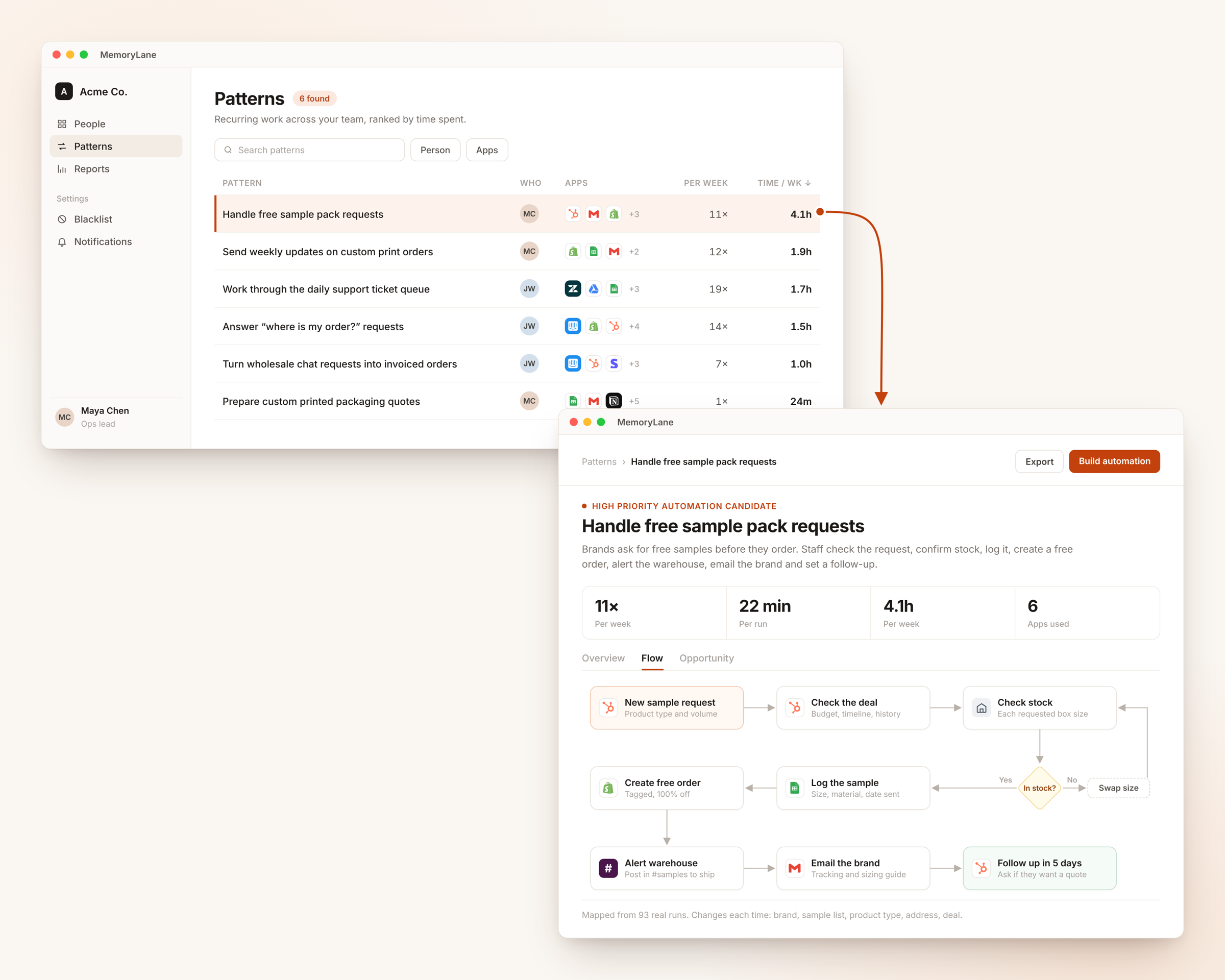
From there, ask Claude through MemoryLane's MCP server to export a workflow as PDF, HTML, BPMN, or Mermaid, or to send it straight to Lucidchart, Notion, or any other tool with its own MCP.
Captured data stays on each device. Screenshots are turned into text summaries through zero-data-retention AI providers, then deleted, and anyone can pause capture in one click. The privacy model is covered in why task mining is not employee monitoring. Enterprise tools like Celonis and Mimica also map processes automatically but start at six figures; see Celonis vs UiPath vs Mimica.
3. Microsoft Visio
- Best for
- Companies on Microsoft 365 that need formal BPMN or UML diagrams.
- How it works
- Someone interviews the team and draws each process with standard BPMN shapes.
- Pricing
- Plan 1 at $5/user/month (browser). Plan 2 at $15/user/month (adds the desktop app). Billed annually.
Visio has been around since the 1990s and is still the default in large organizations, mostly because a basic web version comes with Microsoft 365 business plans.
Visio does formal flowcharts well. BPMN process mapping is its core strength: standard shapes, a large library, and deep integration with SharePoint and Teams. If your company already runs on Microsoft and needs BPMN diagrams, Visio checks the box.
The learning curve is steep and the desktop app feels dated. And the core limit applies here too: Visio does not help you discover what to draw. All the process discovery is still interviews and guesswork.
4. Miro and Creately
- Best for
- Miro for mapping workshops where the whole team edits at once. Creately for the same workshops plus cleaner BPMN diagrams.
- How it works
- The team sketches the process together on a shared canvas.
- Pricing
- Miro is free (3 editable boards), then $8/member/month for Starter or $20 for Business, billed annually. Creately is free (up to 40 shapes per diagram), then $4/user/month, billed annually.
Miro is a collaborative whiteboard, not a dedicated process mapping tool. It is popular for process mapping because anyone can pick it up and everyone can edit at the same time. Run a workshop, drop sticky notes, draw rough flows, and iterate live.
Miro has BPMN shapes and swimlanes, but it is still a canvas. Your maps are drawings, not structured data, with no way to tie a process to its owner or review date. Once you have more than a dozen processes, the boards get messy.
Creately sits between Miro and Lucidchart. It has the same kind of infinite canvas for workshops, plus BPMN 2.0 shapes, and each shape can hold data like an owner or a status. If you want one tool for both the workshop and the clean diagram, it is cheaper than running Miro and Lucidchart side by side.
Both are still manual. You are drawing from what people tell you, so you still miss the work nobody thinks to mention.
5. Scribe and Tango
- Best for
- Step-by-step SOPs and training guides for processes you already know about.
- How it works
- You press record, do the task once, and press stop.
- Pricing
- Scribe is free, then $23/user/month (billed annually, 5 seats minimum). Tango is free (5 workflows, browser only), then $15 to $22/user/month, billed annually.
Scribe and Tango flip the approach. Instead of drawing a flowchart, you record your screen while doing the task, and the tool turns every click into a step with a screenshot. The learning curve is the lowest on this list, and for training docs they are hard to beat.
The limit is scope. Both capture one process at a time, and you pick which one. They do not tell you which processes take the most time, and when a process changes, someone has to record it again. Automated documentation, not automated discovery. For more on recorders and SOP tools, see best workflow mapping software.
6. draw.io
- Best for
- Formal diagrams, including BPMN, at no cost.
- How it works
- You draw every box by hand, in the browser or a desktop app.
- Pricing
- Free and open source.
draw.io has the same kind of shapes as Lucidchart and Visio, including BPMN, and saves straight to Google Drive, OneDrive, or your computer. Real-time co-editing works only when the file is stored in Google Drive, OneDrive, or Confluence, and there is no process repository. If budget is the main constraint, our free process mapping software list compares it with the other free options.
Which one should you use
| Use case | Recommendation |
|---|---|
| Build a structured process documentation repository | Lucidchart |
| Find out where time actually goes and what to automate | MemoryLane |
| Draw formal BPMN diagrams on Microsoft | Visio |
| Run a mapping workshop on a shared whiteboard | Miro |
| Run the workshop and keep clean BPMN in one tool | Creately |
| Create step-by-step SOPs for processes you already know | Scribe or Tango |
| Draw formal diagrams for free | draw.io |
A common setup: MemoryLane finds and ranks the processes, then Claude sends the top ones to Lucidchart for formal documentation or into the team's automation stack.
FAQ
What is the difference between process mapping and process mining?
Process mapping means documenting how work happens, usually as flowcharts or SOPs. Process mining analyzes event logs from enterprise systems (SAP, Oracle) to reconstruct transaction flows. It needs structured system data and typically costs $200K+. Task mining, which MemoryLane uses, captures screen-level activity instead and works without any system integration.
Is Microsoft Visio still worth it in 2026?
If your organization already pays for Microsoft 365 and needs formal BPMN or UML diagrams, Visio still works. Starting from scratch, browser-based tools like Lucidchart or Creately offer the same diagramming with a shorter learning curve and real-time collaboration. Visio's main advantage is that a basic web version already comes with Microsoft 365.
What is BPMN?
BPMN stands for Business Process Model and Notation. It defines specific shapes for tasks, decisions, events, and data flows so that anyone trained in the standard reads the diagram the same way. Lucidchart, Visio, Creately, and draw.io all support BPMN. With MemoryLane, you can ask Claude through the MCP to turn a discovered workflow into BPMN and feed it into existing automation platforms.
What is the easiest process mapping app for a non-technical team?
Miro and Scribe have the shortest learning curve. Miro is a whiteboard anyone can draw on, and Scribe builds a guide while you do the task. MemoryLane needs no drawing or recording at all, because it maps the process in the background.
Can I use more than one tool?
Yes, and most teams do. No single business mapping software covers discovery, documentation, and training. MemoryLane discovers which processes exist and how much time they take. Lucidchart or Visio documents them formally. Scribe turns them into step-by-step training guides. The output of one feeds the input of the next.
I am ready to buy a team plan. What is the quickest way to get set up with user seats and permissions?
Most drawing tools (Visio, Miro, Lucidchart) let you add seats through their admin dashboard. With MemoryLane, book a call and we handle the team setup for you: user seats, privacy controls, and a central dashboard with results from teammates who choose to share them. Most deployments are live within a week.
How do I get my team to adopt process mapping?
The biggest barrier is not the tool, it is getting people to take part. We covered this in how to successfully roll out AI. Short version: leaders go first, share their own results, and frame it as removing boring work. The first automation you build should make someone's week visibly better.
Next steps
If you already know your processes, Lucidchart or Visio will document them. If you do not, find out first. Try MemoryLane on your own work, or get in touch to plan a team rollout.